Welcome screen on TV
Your house guide on the TV, with Joy
Connect the smart TV in your listing once. Joy welcomes your guests by name, and they steer the TV and ask Joy anything from their phone.
A TV welcome screen and AI guide for hosts on Airbnb, Booking.com and Vrbo: your digital guidebook on the big screen, with Joy as your guests' AI concierge.
See how to set it up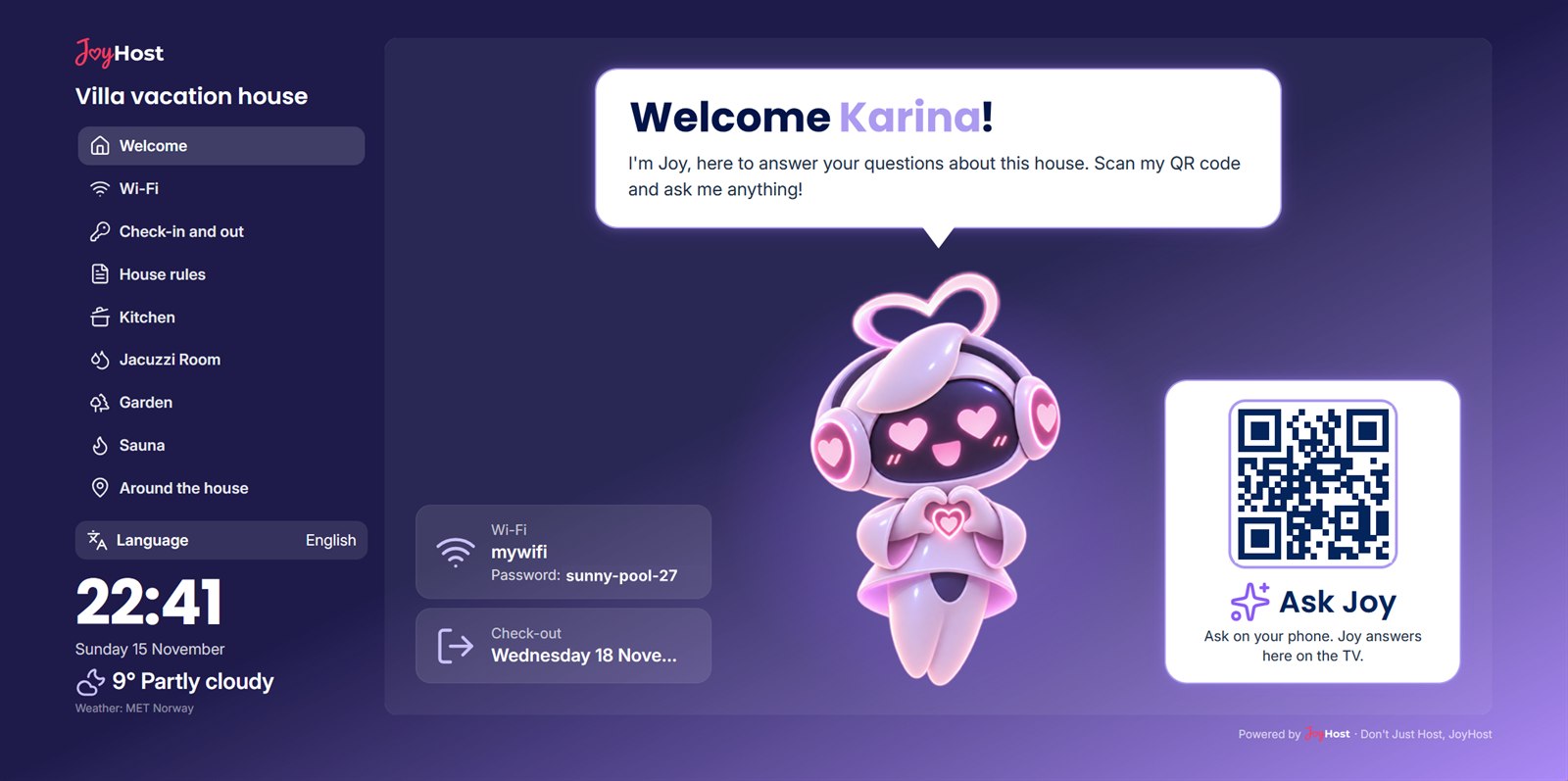

Ask Joy
Ask on the phone, the answer shows on the TV
Scan Joy's code on the TV
With the phone camera, from the sofa. Nothing to install.
Ask in your own language
Type a question: "Where is the coffee?" "How does the jacuzzi work?"
The answer shows on the TV
Big, for the whole group, with the host's video when there is one.
With the AI Joy Assistant switched on for your listing.
Ways to watch
Find the way that fits your TV
Start with your TV's browser today. See which apps we're working on next.
No Roku or Fire TV stick to buy: smart TVs from 2022 should open it in their own browser.
joyhost.app/tv
Use the TV's own browser
Made for smart TVs from 2022. Older ones may work too, and it costs nothing to check.
- 1 Open the web browser on your TV
- 2 Go to joyhost.app/tv
- 3 See a code? Connect it as shown below
Tested on a Samsung TV from 2022 or newer: the code, connecting, a room video and Ask Joy.
No browser, or no code? A laptop on the HDMI port can show the same page.
Systems and versions
| TV or system | Version | Support |
|---|---|---|
| Samsung, from 2022 | Tizen 6.5 or newer | Should work |
| Samsung, 2020 and 2021 | Tizen 5.5 and 6.0 | May work |
| Samsung, 2019 and older | Tizen 5.0 or older | Not supported |
| LG, from 2022 | webOS 22 or newer | Should work |
| LG, 2020 and 2021 | webOS 5 and 6 | May work |
| LG, 2019 and older | webOS 4 or older | Not supported |
| Other TV browsers | Chrome 68 or newer | May work |
Based on what the TV makers publish about each version. TVs differ, so try yours before you count on it.
How to set it up
Three steps, under a minute
- 1
On the TV, open joyhost.app/tv
In the TV's own web browser. The TV shows a 6-character code.
- 2
Open your listing in the JoyHost app
Scroll down to Watch on TV and tap "Connect a TV".
- 3
Type the code, tap "Connect TV"
Add your guest's first name if you like. Your guide shows on the TV and stays there for every guest. Guests steer it with their phone.
Adding your guest's name is optional. Without a name, Joy welcomes everyone.
What your guests see
Your whole guide, made for the TV
A warm welcome, by name
Joy welcomes your guest by first name, with their check-out day. Without a name, Joy welcomes everyone.
Wi-Fi for the whole group
The network and the password, with a big QR code everyone can scan from the sofa.
Check-in and check-out
The days and times of their stay and your own instructions, readable from across the room.
House rules and requests
Side by side and easy to read, with your own message on top.
Your videos, big
Every room with its videos, notes and photos. How the jacuzzi works, on the screen it deserves.
Around the house
A map with the supermarket, the pharmacy, the bus stop and your own tips, with the walking time.
The biggest screen in the house, working for you
Fewer questions
Joy answers on the biggest screen in the house, where the whole group sees it.
A hotel-style welcome
Guests walk in to their own name on the TV, with Joy waving hello.
Nothing to install
On a smart TV with an up-to-date browser there is no app, cable or TV account to set up.
Included in your plan
No extra cost. It works for every listing whose QR codes are on.
Good to know
Made for smart TVs from 2022 with a web browser and internet. Older ones may work, so try yours first.
Save joyhost.app/tv as a bookmark in the TV's browser, so the next guests open it in two clicks.
After 20 minutes without use, the TV dims and goes back to the welcome screen.
The TV only shows what you add. Your guest's first name and dates are optional and deleted 3 days after check-out. Your phone number is never on the TV.
Questions
Do I need a Roku, Fire TV or Chromecast stick?
No. Open joyhost.app/tv in your smart TV's own web browser. Smart TVs from 2022 with a browser should work; older ones may not, so try yours first. An app for Google TV and Android TV is coming with our Android app.
Do my guests need an app or an account?
No. The TV opens a web page, and guests steer it with the TV remote or their phone. They connect it from the house guide in their phone's browser.
Can guests ask Joy on the TV?
Yes, when the AI Joy Assistant is on for your listing. Guests scan Joy's code on the TV, ask on their phone in their own language, and Joy's answer shows on the TV. Joy answers only from what your guide says.
What do guests see on the TV?
A welcome screen with Joy, the Wi-Fi with a QR code, check-in and check-out, house rules and requests, every room with your videos, notes and photos, and the places around the house on a map.
Can the TV welcome my guests by name?
Yes. When you connect a TV in the JoyHost app, or later from the TV card, add your guest's first name and the check-in and check-out dates. During the stay, Joy says "Welcome Karina!" and the TV shows the check-out day. After check-out it goes back to your usual welcome. Only TVs you connected show the name, never a TV a guest connected, and the name is deleted 3 days after check-out.
Which TVs does it work on?
It is made for smart TVs from 2022 with a web browser, such as the "Internet" app on Samsung TVs. TVs from 2020 and 2021 may work, older ones usually don't. Open joyhost.app/tv on yours: if you see a code, you can connect it. A laptop connected to the TV can show it too.
Is there an app for Google TV, Fire TV or LG?
Not yet. An app for Google TV and Android TV is coming soon and one for LG later. We are looking into Fire TV, without a promise. Please don't buy a TV or stick for JoyHost until we say here that it works.
What does it cost?
Nothing extra: the TV is included in JoyHost, €15 per listing a month or €150 a year, with 7 days free. It works for every listing whose QR codes are on.
Can I connect the TV myself?
Yes. Open your listing in the JoyHost app, tap "Connect a TV" and type the code from the TV. That TV stays on your guide until you disconnect it in the app. You can also connect it the way your guests do: open your guide on your phone, tap "Watch on TV" and type the code.
What happens when guests leave?
The TV keeps showing your guide for the next guests. Anyone in the room can tap "Disconnect this TV" on the TV to remove it, unless you connected it in the app.
Can someone else take over my TV?
Only someone who sees the code on the TV itself can connect it, and only phones that scan the code on the TV can steer it. Codes stop working after 15 minutes.

Put your guide on the TV
Set up your listing in the JoyHost app, and your guests can watch it on the TV the same day.